Duplicates after importing from KeePass, LastPass, 1Password or your browser
Why importing into Bitwarden creates duplicates and how to clean them up with BitMerger: recycle bin folders, old backups, equivalent domains and careful matching.
Updated on October 14, 2026
Moving to Bitwarden or Vaultwarden usually starts with an import, and that is where most duplicates come from. This guide explains where they come from and how BitMerger cleans them up without throwing anything away.
Where import duplicates come from
- Importing twice. A first test import, then the real one. Bitwarden does not check for existing entries, so everything is there twice.
- Browser and password manager. You import from Chrome or Firefox and from your old password manager, and both had the same logins.
- The browser extension kept saving. Logins you used after the import were saved again by the Bitwarden extension, sometimes with a slightly different URL or name.
- Old backups and recycle bins. KeePass databases often contain a "Recycle Bin" group or folders like "Backup 2019". After the import they are normal folders full of old copies.
- Shared vaults. A family or team organization contains the same accounts that members also have in their personal vaults.
Leave recycle bins and old backups out
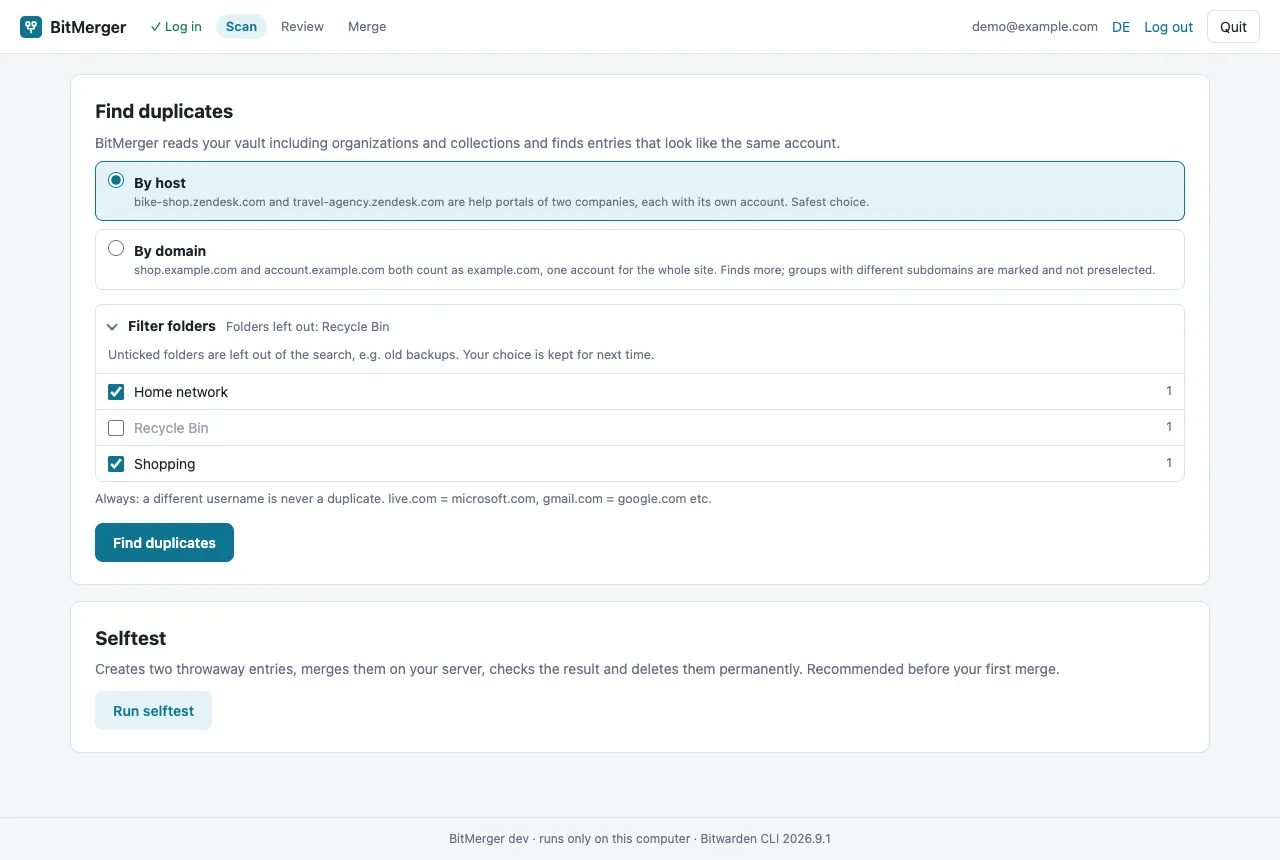
Recycle bin folders brought along by imports, like the "Recycle Bin" from KeePass, are left out of the search by default. Under Filter folders you can untick more folders, for example old backups you want to delete in one go later. Your choice is kept for next time.
Different names, same account
After imports, the same account often has different names: "Amazon", "amazon.de", "Amazon App". BitMerger does not compare names, it compares sites and usernames:
- same site and same username, or
- same site, no username and the same password, or
- no URL, but the same name and username. This weaker match is shown, but never preselected.
A different username is never a duplicate, so jane@example.com and jane.work@example.com on the same site stay separate accounts.
Common equivalent domains count as one site: live.com = microsoft.com, gmail.com = google.com, icloud.com = apple.com, amazon.de = amazon.com. Platforms on the public suffix list, such as *.myshopify.com or *.github.io, always count as separate sites, because every shop or page there belongs to someone else.
By host or by domain?
Imports often bring several URLs per entry, with and without www, with login pages on subdomains.
- By host is the safe start.
bike-shop.zendesk.comandtravel-agency.zendesk.comstay apart. - By domain groups
shop.example.comandaccount.example.comasexample.com. It finds more import duplicates; groups with different subdomains are marked and not preselected, so you decide each one.
You can scan by host, merge the obvious groups, and then scan again by domain for the rest.
Pick the right entry to keep
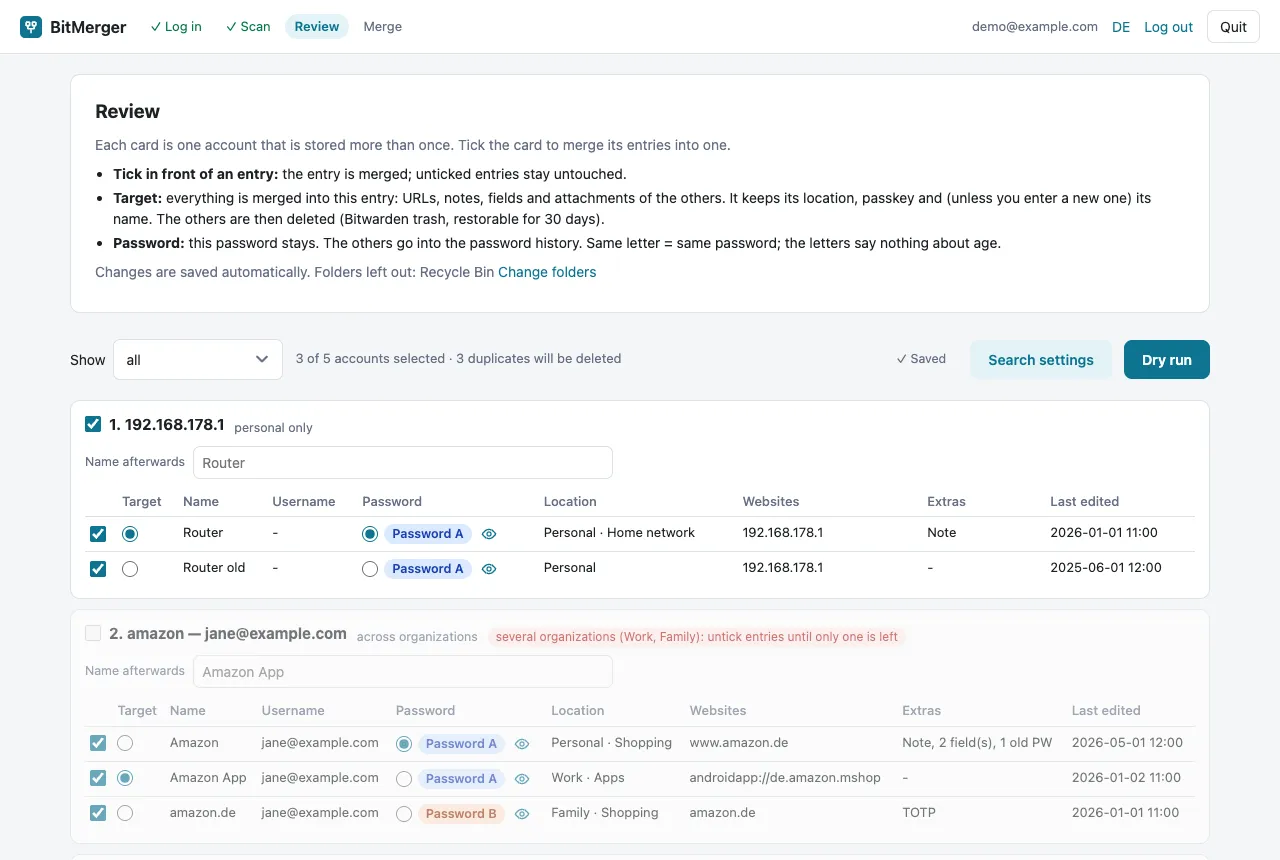
For each group you choose the target, the entry that stays. Good candidates:
- the entry that is already in the right folder or collection,
- the entry with the passkey, if one has it (the target keeps its passkey),
- the most recently edited entry. The review shows when each entry was last changed.
Then choose which password stays. All other passwords go into the password history of the target, so even an old password from the import is not lost. Bitwarden keeps at most five old passwords; if a group has more different passwords than fit, BitMerger skips it instead of dropping one.
What gets combined
| Field | Result |
|---|---|
| URLs, custom fields | combined, duplicates dropped |
| Notes | appended with the name of the source entry |
| Password | the one you chose, all others in the password history |
| TOTP, passkey | taken over if the target has none |
| Attachments | copied to the target |
| Collections | combined (same organization) |
| Duplicates | moved to the trash, restorable for 30 days |
If two entries have different TOTP keys, the second key is kept as a hidden field on the target, so you can still check which one is valid.
Check before merging
Run the dry run. It shows per account which entry is kept, what it takes over and which entries go to the trash. Only then start the merge. After that, you can empty the folders you left out (old backups) in Bitwarden if you no longer need them.